


Owner's Guide
Owner's Guide
Your light, in the right order.
Everything you need to wear, fit, adjust, and care for your VivaRays Light Balancing System. Start with the lens schedule below, then jump to whatever you came for.
01 / Wearing your set
Your lenses follow the sun
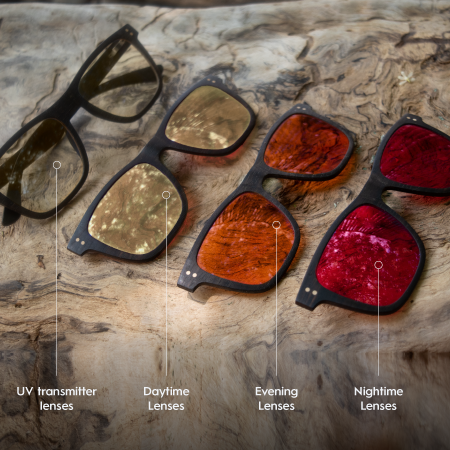
Each lens matches a different moment in the light cycle. Choose your set, then tap a point on the arc to see what to wear and why.
Daytime Yellow
02 / Frame sizes
Find your frame
Every frame is listed as small, medium, or large, with the full measurements beside it. Filter by size or face shape to narrow things down.
Virtual try-on
See how each frame sits on your face before you decide. We are still building this, so use the measurements below in the meantime.
| Frame | Frame width | Lens (W × H) | Bridge | Arms | Weight | With 1 clip | Adjustable | Suits |
|---|
Lens height is measured top to bottom. Weights may vary with readers, prescription lenses, or custom lenses.
03 / Adjusting
Shape them to your face
One of the beauties of our bioacetate and stainless frames is that they adjust. A few careful bends is usually all it takes.
Alegria · Abundance · Sol · Umy
Bioacetate frames
Warm the arms gently, then adjust the temple tips and nose area for a snug, level fit.
Open the bioacetate guideDusk · Aviator
Stainless frames
Stainless arms and nose pads bend cold. Work in small increments and check the fit as you go.
Open the stainless guide04 / Accessories
The small parts in the box
Your glasses arrive with nose pads and ear hooks. They are easy to miss, and they make a real difference to comfort. If your frames slide down your nose, these are the fix.
Grip at the temples
Ear hooks
Slide onto the ends of the arms so your frames stay put when you move, bend, or work out.
Watch the videoLift at the bridge
Nose pads
Add grip and height at the bridge so your lenses sit where they should and stop sliding down.
Watch the videoWe are updating our packaging so these are easier to find in the box.
05 / Swapping lenses
Install or change your lenses
You can swap lenses at home in a couple of minutes, or bring your frames to any local optometrist. Same process any time your prescription changes, so there is no need to buy new frames.
Bioacetate
Alegria, Abundance and Sol
Same technique across all three bioacetate frames.
Watch the video06 / Prescription
Getting your prescription right
Three things decide how your lenses are made: which lens type you need, your pupillary distance, and your lens index. Here is how to work out each one.
How to pick your lens type
Your prescription tells you. The Look for line on each card is what to check on your slip.
If you have a prescription
Single Vision, Distance
For seeing far away. Correction for distance only.
Single Vision, Near
For close-up work like reading a book or using a computer or iPad.
Progressive or Bifocal
Near, intermediate, and distance vision corrected in a single lens.
Office Progressive
Built for computer and desk work. Wide, relaxed vision from roughly 1.3 to 6 meters, which keeps your posture natural through a long day.
Anti-fatigue
For younger adults and people in their early 40s whose eyes tire after long hours on a phone or screen. A small boost at the bottom eases near work while the top stays clear for distance.
If you do not have a prescription
Ready Reader
Reading glasses with the same power across the whole lens, the way an over-the-counter pair works. Choose these if you only need help seeing up close.
All-Day Reader (Bifocal)
Reading power at the bottom and clear distance at the top, separated by a visible line. Choose these if you want one pair you can keep on all day.
Three ways to find your PD
Easiest
Check your prescription
Pupillary distance is usually printed on the prescription from your eye doctor. Have a look there first, and write it down somewhere you will find it again.
At home
Ruler and mirror
Stand in front of a mirror with a millimeter ruler and measure from the center of one pupil to the center of the other.
By phone
Measuring apps
Apps walk you through it step by step using your phone camera.
Choosing your lens index
Under ±4.00
Standard lenses
Recommended for prescriptions below ±4.00.
Over ±4.00
High index lenses
Recommended for stronger prescriptions above ±4.00. Thinner and lighter at higher powers.
07 / Cleaning and care
How to clean your glasses
Five steps, about a minute, and your lenses stay clear for years.
- Wash your hands thoroughlyClean hands are the first step to pristine glasses. You do not want to transfer oil or dirt from your skin to your frames while you clean them.
- Rinse under lukewarm tap waterA gentle stream removes dust and debris, which helps avoid scratches during cleaning. Skip hot water, as it can damage the lens coatings.
- Add a drop of lotion free dish soapUse a fragrance free, lotion free soap, ideally biodegradable. Put a small drop on each lens and spread it over the lenses and frames with your fingertips.
- Rinse lenses and frames thoroughlyUnder a gentle stream of tap water, rinse both sides of the lenses and the frames until all the soap is gone.
- Dry with your microfiber cloth or pouchWipe dry with a clean, lint free cloth in a side to side motion. Avoid circular motions, which can grind leftover grit into the lenses.
08 / Winter Course
Access your Winter Course
Your course is tied to the email address you used at checkout. Register with that same address and everything unlocks on its own.
- Create your accountGo to vivarays.com/account/register and register using the same email address you used at checkout.
- Verify your emailOpen the verification email we send you and activate your account.
- Open your courseClick the Course tab in our menu, choose Login, then sign in. Your course is waiting at vivarays.com/apps/my/courses/list.
Still have a question?
We are real people, and we love hearing from you.
If your answer is not here, send us a message and our team will take care of it.
Get in touch